

CAD/BIM Tips & Tricks
Why The Digital Twin Matters: The World’s Most Impressive Digital Twins Projects
10 June 2026
If you work in CAD or BIM, you already live in the world of digital replicas. You build virtual models before a single beam goes up, catch clashes before they become expensive surprises and hand off data-rich files that outlast the project itself. You’re basically a digital twin pioneer, even if your job title doesn’t say so.
But the concept has grown. Way beyond a single building model, digital twins now encompass entire cities, railway systems, space facilities and smart megaprojects that are redefining what it means to plan, build and manage the built environment. Here’s a look at some of the most impressive examples on the planet right now and what they mean for the AEC folks who build our world.
A digital twin is a dynamic, continuously updated digital replica of a physical object or system, connected to real-world data feeds.
What Is a “Digital Twin”?
Before we dive in, let’s take a brief definitional pit stop, just so we’re all on the same page. A digital twin isn’t just a 3D model sitting on a server somewhere. It’s a dynamic, continuously updated digital replica of a physical object or system, connected to real-world data feeds from sensors, IoT devices and operational systems, so the model reflects what’s actually happening right now, not just what was designed years ago.
While the BIM model is like a 3D image of the project, the digital twin is more like a live video stream, feeding us all kinds of information in real time, for the life of the structure.
Virtual Singapore is widely recognized as the first digital twin of an entire country.
That difference matters because some of the projects discussed below started life as one thing and then evolved into something much more sophisticated. Others were conceived as digital twins from day one. All of them are genuinely impressive.
Virtual Singapore: A Whole Country in a Computer?
Let’s start with the one that rewrote the rulebook. Launched in December 2014 as part of Singapore’s Smart Nation initiative, Virtual Singapore is widely recognized as the first digital twin of an entire country. Yup, you read that right: the entire country. Sure, Singapore is only 287 square miles in size, but do you know of another digital twin project of this scale?
The Singapore Land Authority (SLA), the National Research Foundation (NRF) and the Government Technology Agency (GovTech) collaborated on the project, which used laser-scanning aircraft and ground vehicles to capture terrain, buildings, roads, green spaces and underground infrastructure across the entire city-state.
The platform, built on Dassault Systèmes’ 3DEXPERIENCity technology, gives urban planners and government agencies the ability to simulate flood risk, test emergency response scenarios, analyze energy consumption and assess accessibility, all without leaving the comfort of their office chairs.
A simple click on a building reveals how much electricity it consumes. Planners can test whether a new ramp for disabled access conflicts with a town council garden project, resolving the issue digitally before anyone picks up a shovel.
The investment? A reported SGD 73 million (USD $568.6 million) over five years. The return? An urban planning platform that serves millions of residents and has inspired copycat programs around the globe.
And Singapore isn’t stopping there. The SLA is now building a national subsurface digital twin: a 3D map of everything buried underground, because they’ve moved so much of their utility infrastructure below ground that even the subterranean space needs its own digital management layer. They’ve literally twinned the underworld.

London’s Elizabeth Line: Two Railways for the Price of One
The Crossrail project, now operating as London’s Elizabeth Line, is Europe’s largest infrastructure project, stretching 73 miles across Greater London with a capital investment of approximately £18.7 billion (USD $25 billion). It was also, arguably, a masterclass in building two things simultaneously: a physical railway and a virtual one.
Crossrail Limited began constructing its digital engineering environment in 2008, using BIM combined with spatial modeling technologies, GIS and 3D CAD linked to information databases. The philosophy, as described in the project’s own documentation, was straightforward: design, build and operate the virtual railway alongside the physical one, so the two could inform each other at every stage.
In practice, this meant that before tunnels were bored, clash detection had already been run on the models. Before stations were fitted out, the digital versions had been walked through, tested and revised.
Crossrail’s documentation has been clear that the final result wasn’t a “full” digital twin in the strictest IoT-connected sense. Construction changes in the field weren’t always reflected back into the models in real time, which is a common and honest challenge in large-scale infrastructure.
The Shanghai Tower is one of the most compelling examples of BIM enabling design that would have been virtually impossible to coordinate any other way.
But the project pushed the industry forward significantly and produced a common data environment that set the standard for how information should flow on complex rail projects.
The Elizabeth Line now carries hundreds of millions of passengers a year and is designed to serve London for at least 120 years. The virtual version is expected to be equally long-lived, supporting operations and maintenance across its entire lifetime.
The Shanghai Tower: BIM at Its Most Ambitious
At 632 meters, the Shanghai Tower is China’s tallest building and the third tallest in the world at the time of publication. It’s also one of the most compelling examples of BIM enabling design that would have been virtually impossible to coordinate any other way.
Designed by Gensler and completed in 2015, the tower consists of nine cylindrical buildings stacked on top of one another, with an outer façade that rotates 120 degrees as it rises. That beautiful spiral isn’t just for good looks: it reduces wind loads on the structure by approximately 24%, a design insight that emerged from computational modeling and was only realizable because the entire project was run in a BIM environment.
The project team used Revit for architecture, structure and MEP design, Navisworks for coordination and clash detection, and Ecotect for environmental analysis. The 380,000-square-meter mixed-use development includes Class A office space, a luxury hotel, retail, a 2,200-seat arena and connections to the Shanghai Metro, all coordinated through a unified information model across seven construction firms and multiple disciplines.
By one estimate, BIM coordination reduced construction costs by around 32% compared to what a traditional 2D approach would have cost. Given the complexity of a 121-story tower with seven structural systems and more than 30 mechanical, electrical and intelligent subsystems, that’s not an insignificant statistic to ignore. It’s a powerful reminder of why you and the CAD/BIM tools you use every day are quietly doing something remarkable.
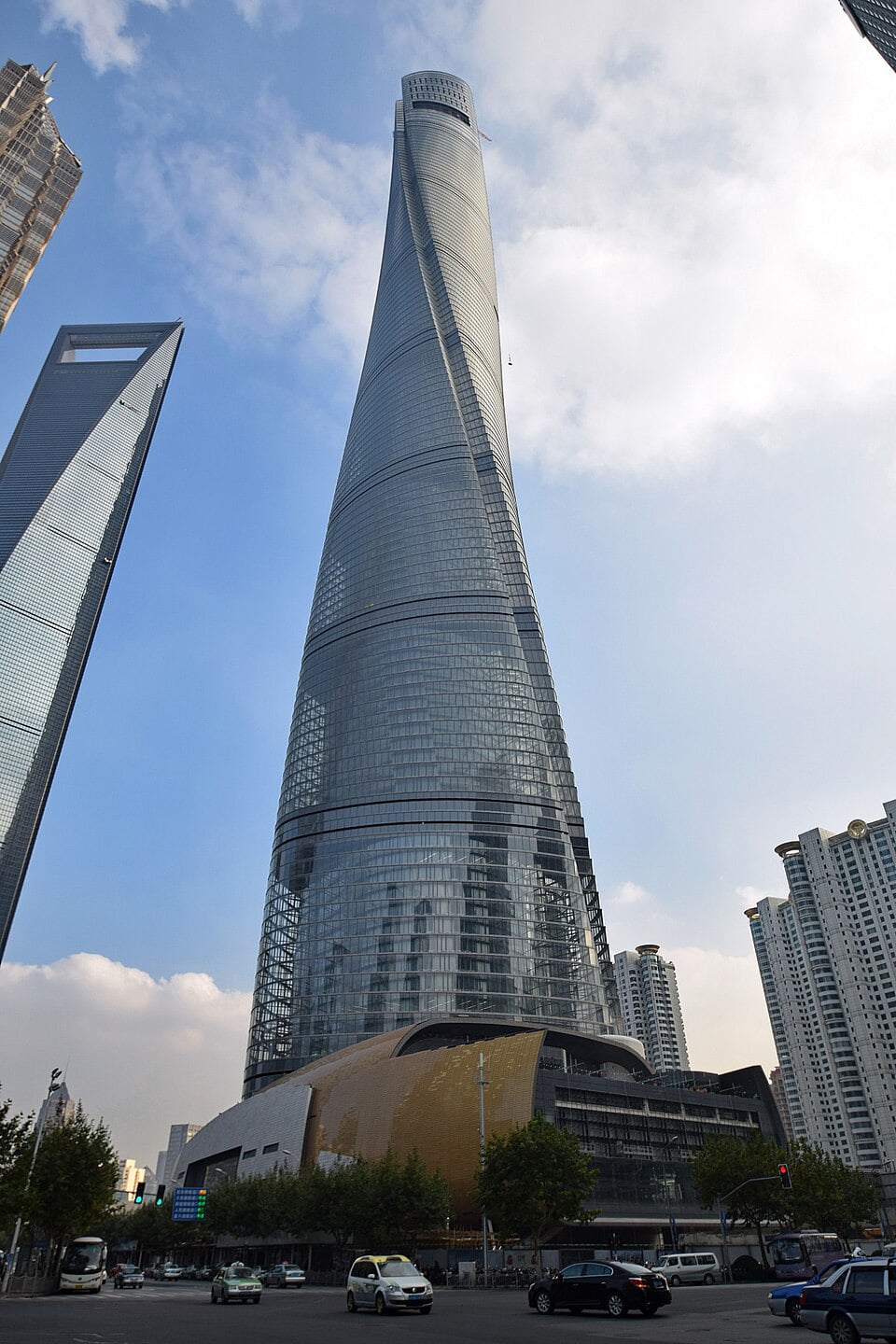
The soaring, spiraling Shanghai Tower. Pure BIM.
NASA’s Michoud Assembly Facility: A Giant Twin for Rocket Science
You wouldn’t normally expect a 60-year-old manufacturing facility in Louisiana to be at the cutting edge of digital twin technology. But NASA’s Michoud Assembly Facility (MAF) is exactly that. It’s one of the largest manufacturing complexes in the world, with more than 800 acres of land and 43 acres of manufacturing space under a single roof. That’s two million square feet of manufacturing space.
MAF is where the Space Launch System and the Orion spacecraft are developed and produced. NASA, in partnership with Louisiana State University and the National Center for Advanced Manufacturing, has been building a real-time digital twin of the entire facility to modernize operations and improve how the facility is managed.
The challenge was significant: MAF has decades of legacy infrastructure, processes and institutional knowledge that needed to be captured, organized and made useful in a living digital model.
This isn’t just about knowing where the walls are. The digital twin of MAF allows maintenance to be predicted rather than reacted to, supports facility planning as new space systems come online, and helps connect a historic facility’s past with the demands of next-generation space exploration.
NASA has also launched a digital twin pilot for the Orion spacecraft itself, initiated in 2020 at Johnson Space Center, to improve engineering visibility during flight operations and reduce the time required to answer critical questions from days to hours.
How Houston Solved the Problem: An Origin Tale
It’s worth noting that NASA’s relationship with digital twins goes back further than most people realize.
Back in 1970, when Apollo 13 was roughly 200,000 miles from Earth, damaged wiring inside Oxygen Tank No. 2 caused a spark, triggering a massive explosion that vented all of the oxygen into space and damaged the main power systems, leading to Commander James Lovell’s now-famous transmission to Mission Control: “Houston, we’ve had a problem.”
The crew transferred into the Aquarius lunar lander, designed to sustain two men for just two days. It successfully kept three men alive for four days. How?
This incident is widely cited as the conceptual ancestor of digital twin technology.
NASA engineers on the ground immediately leapt into action. Most notably, they designed a workaround using the on-site living models and materials available to the astronauts to adapt the carbon dioxide scrubbers in the lunar lander, preventing the crew from suffocating.
After enduring freezing temperatures, diminishing water supplies, and severe exhaustion for a harrowing four days, the crew successfully splashed down safely in the South Pacific Ocean, accomplishing what NASA later termed a “successful failure.”
While the term “digital twin” would not be coined for several decades, what the NASA engineers effectively did was to use the replica models and materials combined with real-time data to save the astronauts’ lives. Today we call that a digital twin. We bet those three astronauts called it, “Thank God.”
This incident, however, is widely cited as the conceptual ancestor of digital twin technology. From saving astronauts’ lives with physical mockups to managing rocket factories with live data models, the lineage is a long and impressive one.
NEOM and The Line: Twinning Before Building
NEOM, Saudi Arabia’s ambitious megaproject, is one of the most talked-about and hotly debated urban development programs in the world. Originally announced as a 170-kilometer linear city, The Line project has been significantly scaled back as of 2024 to an initial 2.4-kilometer development phase, with a construction timeline that may extend over a century.
What makes NEOM interesting from a digital twin perspective is that the technology isn’t being retrofitted after the fact. It’s being designed into the project from the very beginning.
NEOM’s first subsidiary, the NEOM Tech and Digital Company, launched in February 2022 to develop XVRS, described as a “3D cognitive digital twin metaverse platform.” This isn’t just a planning tool. The vision is for residents and visitors to interact with NEOM as a digital space — touring areas, attending meetings and exploring the city as avatars — before and alongside the physical build.
NEOM also positions itself as what it calls “the world’s first cognitive city,” with a digital twin architecture designed to coordinate energy, mobility and public safety in real time.
Whether it fully delivers on that ambition is a question that could take years to answer. But as a proof of concept for what happens when digital twin thinking is embedded at the planning stage of a major city rather than bolted on afterward, it’s worth watching closely.
The global digital twin market was valued at approximately $20.4 billion in 2024 and is projected to reach $293 billion by 2035.
What This Means for CAD and BIM Professionals
The scale of these projects can feel a little distant from the day-to-day of managing a complex design file or coordinating references across a multi-discipline team. But the thread connecting them to your work is direct.
Every impressive digital twin starts with the same foundational discipline that runs through good CAD and BIM practice: accurate data, well-structured models, consistent standards and meaningful coordination between teams. Virtual Singapore couldn’t function without precise 3D capture. The Elizabeth Line’s digital model depended on disciplined information management across thousands of contributors. The Shanghai Tower was only buildable because Revit kept seven construction firms working from a single source of truth.
Spend less time wrestling with your tools and more time doing great work.
The digital twin market is growing fast. According to research from Spherical Insights and Consulting, the global digital twin market was valued at approximately USD $20.4 billion in 2024 and is projected to reach USD $293 billion by 2035.
The skills that make someone good at CAD and BIM today — precision modeling, data management, coordination and platform fluency — are exactly the skills that underpin every layer of that growth.
The world’s most impressive digital twins aren’t happening in spite of people who care about clean models and well-managed data. They’re happening because of them.
Want to get more out of your CAD and BIM tools? Axiom builds software for MicroStation, AutoCAD, Revit and BricsCAD users that helps you spend less time wrestling with your tools and more time doing great work. Chat with us online at AxiomInt.com or call us at 727-442-7774 to get answers to your questions.
